Working in the Information Technology field for over 17 years has its advantages. Mostly, the knowledge I've gain from being hired to help an IT project recuperate from failure. As America struggles to get back on its feet, most companies are working hard not to have a failed project. This is because failed IT projects are very costly in that the company spends money; but gets nothing in return. The following paragraphs list the top six reasons I've seen IT projects fail.
#1. Unfounded Requirements Assumptions
Within IT, we all know requirements are defined by the customer (see my blog article titled: Requirements: Understanding the Customer's Vision ). Requirements may come from taking notes during a meeting with the stakeholder and translating the notes into requirements. Alternatively, requirements may also come from making a list of questions that you ask the stakeholder. You then use the stakeholders' response(s) to define one or more requirements. So, what about assumptions? Even if a Business Analyst or Systems Analyst derives assumptions; the assumptions should also be discussed with the stakeholders. What's not a good practice is adding assumptions to a requirements document; and, distributing the document without discussing the assumptions with the stakeholders. Discussing assumptions with the appropriate stakeholder(s) before adding them to the requirements document is essential. This approach develops trust and shows the stakeholders they are in charge.
To avoid confusion or miscommunication, it's best to make sure all requirements are discussed, especially those derived from assumptions, before they are added to the requirements document.
#2. Making Promises Without Understanding What it Would Take to Keep Those Promises
This is one of the most frustrating problems--especially for those who diligently work hard to ensure all projects they support are successful. Those responsible for negotiating timelines with the customer should always talk to the team about proposed timelines before any promises are made. If short timelines are needed, the best approach is to prioritize requirements. This way requirements can be implemented by priority (understanding that all requirements can't be assigned a "High" priority). Negotiating realistic time-frames is key to successfully completing a project. On the other hand, making promises that include short turnaround times for larges amounts of work isn't a good idea. This usually leads to poor quality work that frustrates the customer and makes the entire IT team look and feel bad.
#3. Using a Role Other Than A Business Analyst/Systems Analyst to Gather Requirements
Requirements gathering is about more than just talking and writing. The Business Analyst/Systems Analyst responsible for defining requirements has learned elicitation techniques to define what the customer needs and wants. In addition, the Analyst has learned Gap Analysis techniques, traceability and other requirements-related techniques. Assuming anyone on the team, including Technical Writers or Developers, can define requirements can lead to costly mistakes. The roles in IT are divided such that each team member brings the specialty needed to accurately accomplish specific activities within the Software Development Life Cycle. When a practice other than an industry best practice is used; unwanted, unexpected results will usually surface.
#4. Releasing Software Without Proper Documentation
Before a new system is released, the proper documentation should be created. Most team members hate writing documentation; but that doesn't minimize the fact that system documentation is crucial. Any new business application should be accompanied by the following:
a. End-User materials - User's guides, getting started guides, quick reference guides and other materials needed to tell the user how to install, setup and use the system is important. (See my blog article titled Technical Writing & Technical Training Materials.)
b. Training Materials - Some systems may be complex enough to require user training. For example, Enterprise Resource Planning Systems (ERPs) should never be implemented without a cohesive plan to provide users with training. Training is important because it ensures users understand how to use the system to do their job. (See my blog article titled Technical Writing & Technical Training Materials.)
3. Re-engineered Business Process Document - If a new business application causes an organization's business process to change; it is imperative to educate the users. For example, to order a magazine users may call the support desk. The Customer Service Rep. do the following:
1. Take the order;
2. Type up a label and invoice; and
3. Send the request to the mailroom to fill the order and mail it out.
But, what if the company installs a new system. With the new system, the customer still calls the support desk. However, instead of typing up the invoice and mailing label; the Customer Service Rep. is now expected to enter the information into the system. The system then creates the invoice and sends a notification to the mailroom. Notice how end-user documentation will tell the Customer Service Rep. how to use the system to place the order. But, also notice how the process has drastically changed. Neither end-user nor training materials typically address the business process changes. This is why a plan should be implemented to document the business process change. The documented process change can be made part of the end-user's training. Or, the relevant documents can be given to employees impacted by the change. This ensures the organization continues to run smoothly with little downtime. It also ensures employees understand how to do their jobs with a new system in place. (See my blog article on Business Process Re-Engineering and Enterprise Architecture, Segment Architecture & Solution Architecture ,)
#5. Hiring a Project Manager Who Doesn't Understand the Project Manager's Role
The Project Manager (PM) is one of the key people on the project. In addition to managing the project budget, timelines and deliverables; the PM is the key interface between the IT team and the customer. It is important that the PM understand the balance between customer responsibilities and the IT team.
I worked on an important project with a PM who negotiated due dates without establishing "how" the work was to get done. The PM wanted the customer to pick the templates and methodology that would be used to complete the work. With due dates already negotiated, I knew the more time it took to get the project started; the less time we had to complete the work. I knew the longer we "sat back and waited on the customer"; the less likely we were to succeed. Instead of sitting around I put together the templates based on the methodology I thought would be best for the customer's environment. Although I was not the PM; I still did not want to be part of a failed project. I pleaded with the PM to take the templates to the customer and ask the customer to simply review and provide input on what we provided. One meeting between the PM and customer gave us the go-ahead we needed to get started. The customer became enthusiastic because the project began to move forward. Things were getting done and the customer knew exactly what we would deliver and the approach we would use to do the work. As problems arose the PM was stumped. But, each time I used my experience to advise the PM on the best way to tackle the problem to achieve maximum project success.
Not everyone on a project team will have the experience I have. But if the team has a Project Manager who understands the various IT roles, SDLC methodologies, the customer's role and most importantly the Project Manager's role and responsibilities--things should go just fine.
#6. Not Using a Cohesive Methodology to Implement Software
It is not uncommon for a non-IT company to believe IT work can be accomplished without a methodology. The one company I stepped into that did not use an IT methodology to complete IT work experienced failure over and over again prior. The non-IT company hired IT people. But, since the non-IT people didn't know what they were doing; they inadvertedly hired IT people who didn't know what they were doing. So, the non-IT company ended up with an IT Department that had extremely weak IT skills.
Consequently, no one in the company trusted the IT Department. When I interviewed to join the IT team; the IT team assured me everyone (besides the IT Department) was responsible for the project failures. I wanted to discuss the methodology being used to do the work. I was told a methodology had not been adopted. So, the first thing I did was point out that it is impossible to successfully complete a project without using an "established" methodology.
I recommended an approach and created and circulated the templates. I documented the approach using a Visio diagram that everyone could follow and understand. Then I suggested that we try the approach out on a small scope of work, which we did. Everything went smoothly and the project was a success. The company adopted the methodology and greed no IT work would be done without using the agreed upon approach.
In short, never try to complete IT work without using an established methodology. These methodology were established after teams attempted to do work without them.
In Summary
Following is a list of things you can do to keep your IT project on the right track and avoid the blunders that cause projects to fail:
#1. Always have unfounded requirements assumptions approved by the stakeholder before they are stated as requirements.
#2. In IT, always understand what it will take to keep a promise before you make the promise.
#3. Always use a Business Analyst/Systems Analyst to gather and manage requirements.
#4. Always make sure proper documentation has been developed before releasing a new software application.
#5. Always hire a Project Manager who understands the Project Management role in its entirety and has experience successfully filling the role.
#6. Always use a cohesive methodology to implement a software application.
Showing posts with label business process. Show all posts
Showing posts with label business process. Show all posts
Sunday, February 24, 2013
Tuesday, September 7, 2010
The Business Process Analyst & the Business Process
A business process analyst, business analyst or systems analyst is used to review the business process if a new system is about to be built; or, massive changes are about to be made to an existing system. This post focuses on documenting the business process associated with implementing a new or updated system. The topics that will be discussed are gathering business requirements, documenting business requirements, tracing business requirements and generating the data dictionary.
Gathering Business Requirements
When defining a new system or system updates; the business process analyst will typically review the business process steps as they are performed by the worker. Some organizations use MOST work measurement to not only capture business process steps, but determine the amount of time it takes to perform each step. This information is then used to define the exact number of people needed to complete a job within a specific time-frame. However, for Information Technology projects MOST work measurement is typically not used because companies are looking at the process steps and related information; usually, they aren't looking to assign time values to the process.
To review the business process the business process analyst may be tempted to want to "talk" to individuals to capture this information. But there are one of two approaches that will guarantee the information documented is accurate:
1. Review & Validate a business process already documented: If the business process has already been documented; the business process analyst may ask for a copy of the document. Next, ask a worker if you can shadow him/her as the worker performs the process one time. This provides an opportunity to validate the accuracy of the business process document. In other words, determine whether or not some of the process steps have changed since the document was written. If so, update the document to reflect the changes and circulate the updated document for review.
2. Document a business process that has never been documented: If the business process has not been document the business process analyst should shadow a worker and watch as the worker does his/her job. The business process analyst will watch closely and ask questions as the worker performs the process steps necessary to complete the task. The business process analyst will ask about the business rules applied, software used to capture data (inputs) or generate documents (outputs). The business process analyst will also capture the process flow. The benefit here is, if a new business software is to be built it can be built to support the existing process so the business process changes very little. This means instead of the process changing, the tools used to perform the business process changes. Or, if the business process will change, the process changes can be documented so workers can do their job once the new/updated system is implemented.
The following sections provide one way to document the business process, business rules, inputs, and outputs.
Documenting Business Requirements
Business requirements are typically documented in the form of business rules. But, capturing the business process provides more than just business rules. You will also document business process steps, inputs and outputs. The inputs and outputs typically provide requirements used to define reports or user interface fields. These elements are ultimately used to define database table fields and the table field relationships needed to generate the outputs.The document reflecting the current business process is the As-Is business process. After stakeholders/users discuss how they would like to do business with the new/updated system in place; you will need to write the To-Be business process document.
In the following As-Is example, Company "A" users upload enhancement requests to a shared drive to request changes to the company's software product. This section provides a high-level overview of the current business process, the actors, and process owners. The To-Be Business Process Operations Report outlines how the business process is performed with the new/updated system in place.

Input Documents
Document Name
|
Description
|
Step ID
|
Notes
|
Enhancement Request
| The Enhancement Request is currently created using an Exchange Form. The re-engineered process will need to store each request in a database. Users will be able to submit these requests online using the updated system. |
Step 1
|
(For the TO-BE environment, the customer wants a document library using content types so that all related documents for an Enhancement Request are centralized and easily accessible. )
|
| Impact Analysis Report | The analyst emails a copy of the Impact Analysis report to the CCB reviewers. | Step 2 | A COTS will be used for the TO-BE environment. |
| Test Documents | Step 4 | ||
| Release Notes | The Technical Writing Department is responsible for updating the Release Notes and uploading the document to the shared drive. The path is sent to Product Support and the Deployment team. | Step 4 |
Output Documents
Document Name
|
Description
|
Step
|
Notes
|
| N/A | Currently there are no outputs. The TO-BE Business process should include information on the reports to be generated for the new process. | Step 5 |
Sub-Process Operations
In this example, the BSA uses a separate process to create the Impact Analysis report. Therefore, a Sub-Process Operations report would be created to capture the steps. The ID of the Sub-Process Operations Report would include the Parent ID and the step number (i.e., Business Process ID: 2237.2). The business rules, inputs and outputs would also be captured.
Generating the Data Dictionary
Once you have documented the inputs and outputs, it's a good practice to create a data dictionary. At a minimum the data dictionary should include the element name (such as Enhancement ID or user ID), description, whether or not the element is required, the data length based on any forms and/or business rules, data format (for example dates must be mm/dd/yyyy), data type (i.e., date, string, etc.). Following is one example of a data dictionary. Microsoft Press published a book titled "Software Requirements. It also includes an example of a data dictionary.
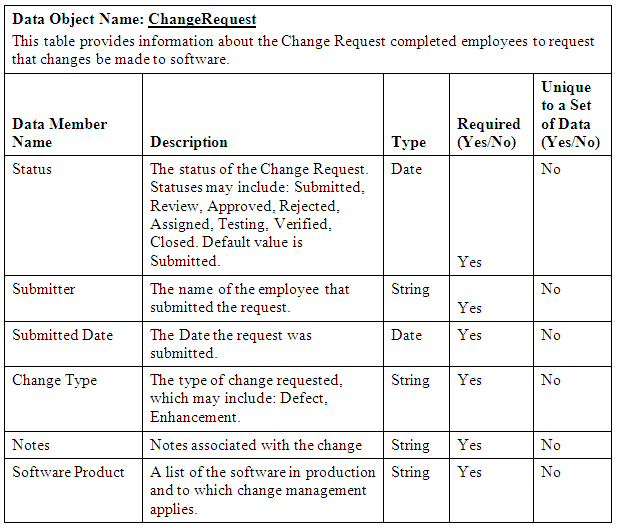
Business Process To-Be Report
To capture the To-Be business process requirements stakeholders should review how business is currently done. In addition, a list of current business problems is also captured. The Analyst should look for opportunities in which automation can help the business process become more efficient. And, users and stakeholders should be prepared to discuss problematic areas. All of this information can help the organization look for opportunities to improve the way business gets done.
Business Process Flow Diagram
Another way to capture the business process is to create a business process flow chart, which uses symbols to define the business process. The following picture shows the As-Is business process used to Bill Customers.

In the previous process flow diagram the process begins with the IT Department. The rows shown on the process flow diagram includes horizontal swimlanes. A swimlane is the rectangle that depicts an actor. A swimlane can be horizontal or vertical depending on the number of actors and number of process steps. The shapes inside the horizontal swimlane depict the process start, process documents (i.e., complete timesheet), sub-processes (i.e., Process Customer Bill), process decisions (i.e., approved?) and process end.


Subscribe to:
Posts
(
Atom
)