Thursday, June 13, 2013

Software Design with UML - Object Oriented Programming Intro

This blog article covers basic concepts associated with designing a business application. It walks through the most common Unified Modeling Language (UML) diagrams used to design business applications. The Unified Modeling Language is managed by the Object Management Group (OMG) at http://www.omg.org. This site contains additional information about UML and the diagrams discussed below.

The article assumes you are an IT professional familiar with basic software design concepts. The last part of the article provides a brief overview of object oriented programming primarily to provide insight to the Class diagram and the meaning of a class.
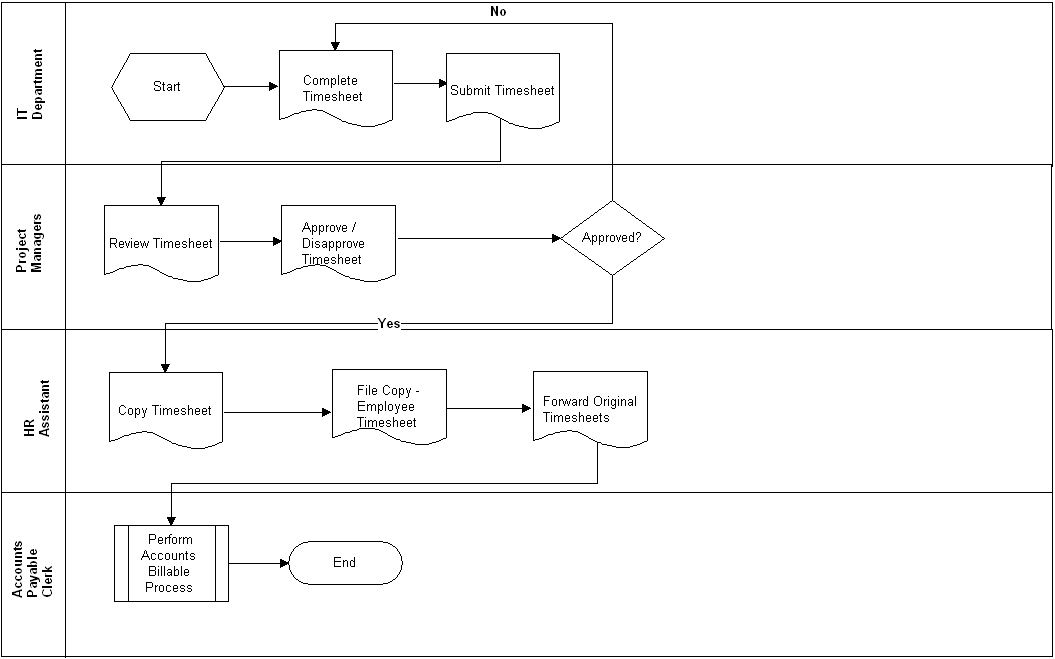
The System We Are Going to Design


In this article we are going to design part of the Time Management System (TMS). IT Department Staff will use TMS to submit the hours they spend on a customer's project. Project Managers will use TMS to Sign-Off on Timesheets. Human Resources will use TMS to print out a copy of each employee's timesheet for the employee file. The following Business Process Flow Diagram shows the current process used to process timesheets. In the following diagram the timesheets are ultimately sent to the Accounting Department for customer billing, but that aspect of the process is outside the scope of this article.


Features, Use Cases & User Stories


In this section we will take a quick look at the features and use cases we will use to model. We will also translate our use cases into user stories; and, take a look at how we can model user stories.


Feature

Description

FE1. Manage Timesheets & Approvals

This feature manages all requirements associated with creating a timesheet, submitting a timesheet, editing a timesheet, approving a timesheet and disapproving a timesheet.

Following is a partial list of use cases for TMS. These use cases would be grouped using FE1:
 

Use Case Name

Actor

Flow

UC1. Submit a Timesheet

All IT Department Staff

1. Add a new timesheet.
2. Complete the timesheet.
3. Click the Submit button. The timesheet is submitted.

UC2. Sign-Off On a Timesheet

Project Managers

1. Select a timesheet.
2. Review the timesheet.
3. Click Approve. 
4. Submit the timesheet. The timesheet is marked as approved.
Alternate Flow:  Branch at step 3.
3. Click Disapproved.
4. Submit the timesheet. The timesheet is marked as disapproved.

UC3. Add a Project

Project Managers

1. Select Projects from the menu. The Projects page displays.
2. Click Add Project button. The Add Project page displays.
3. Complete the fields on the page.
4. Click Save. The project is added.

UC4. Add Project Tasks

Project Managers

1. Select Projects from the menu. The Projects page displays.
2. Select a project. The Project Details page displays.
3. Click Add a Project Task. The Add a Project Task Page displays.
4. Complete the fields on the page.
4. Click Save. The project task is added and associated with the selected project.

UML diagrams provide a way to visually communicate software functionality to developers. An IT professional's design skills should include the ability to translate requirements into a cohesive software design that includes classes, the relationship between classes as well as interaction and communication among objects. As well as the state of an object as events occur.

Use Case Diagram


Use Case Diagrams provide a visual way to depict the use cases that make up a system, the actors that interact with the use cases, and the relationships and type of relationships (i.e., extends, includes) between use cases. Below is a partial TMS Use Case Diagram.


Understanding what use case extends another use case; or, what use case includes another use case is very useful. For example, since we know Submit Timesheet includes Add Project Tasks we know one cannot be implemented without the other if full functionality is to be achieved for the including use case. For example, if we implement the Submit Timesheet use case without the Add Project Tasks use cases users will not be able to assign their hours to a project task. These use cases should be prioritized in a way that ensures they are implemented either in the same release or releases in close proximity to one another. If the Submit Timesheet use case is assigned a "High" priority the Add Project Tasks use case should also be assigned a "High" priority. This would be done to ensure they are implemented within the same release or releases in close proximity to one another.

Note that there may be occasion for the stakeholder to agree to reduced functionality to get a part of the system into production as quickly as possible. If this is the case, the two use cases may be assigned different priorities and implemented during separate releases. These releases may or may not be in close proximity to one another.

An extends relationship does exactly what it says. It extends the behavior of a use case such that additional actions can be performed using the extended use case. In the above diagram Sign-off on Timesheet extends Submit Timesheet. This means, the Sign-off on Timesheet inherits most or all of the same capabilities as the Submit Timesheet use case. However, the Sign-off on Timesheet has additional functionality. In this example, the extended behavior is the ability to approve or disapprove a timesheet.

User Story Diagram


User stories can be diagrammed as well. Some developers and project managers may need to see diagrams to reinforce design information. The following diagram shows one way user stories can be captured using the use case diagram concept.


Class Diagram


The Class Diagram shows the classes used to build the application. The class diagram includes the behaviors of the class, shown as operations. For example, the Timesheet class includes the following operations getDate(Today), which is an operation used to return today's date to the timesheet. Each class also includes the attributes of the class. The attributes of the class are implemented as properties of a class. The properties of the class may implement business logic. The operations and the attributes may or may not be implemented in the same class, during development. It all depends on the approach being used to build the software. For example, web services versus regular web classes.


Sequence Diagram


The Sequence Diagram is used to show communication messages between the components or instances of the classes that make up of the application. The TMS Sequence Diagram below shows the communication between the user and the Timesheet, Employee, Projects and Project Task objects.


State Machine Diagram


The State Machine Diagram captures the state of an entity in response to events that affect the entity. The following State Machine Diagram shows the state of the timesheet as events (the text beside the arrows) cause the state (the green rectangles) to change.

Activity Diagram


The Activity Diagram can be used to model the flow within use cases. In the below example, the activity diagram reflects the activity as it pertains to the Timesheet. The forks in the flow capture the alternate flows within the use case. Alternatively, the Activity Diagram can also be used to model user interface screen flows and business process workflows.


Object Oriented Programming (Objects, Events, Methods And Properties)


Understanding Object Oriented Programming concepts is necessary to effective design business applications--particularly complex systems. The following paragraphs provide a brief overview of object oriented programming concepts.

In object oriented programming classes are used to build applications. For example, when you navigate to Facebook and click the Post button, that button was created from a Button class. To create the button object from the button class the developer must create a copy of the button class. The programming language used defines the code that must be written to create the copy. The most important thing about creating a copy of a class is that the copy must be given a unique name. Once a developer creates a copy of the class, also called an object, the developer can customize the object. When the developer creates a copy of the class the developer has actually created an instance of the class.

In .NET all classes are grouped by namespace. Therefore, if the developer wants to find a class he must look under the appropriate namespace. In the following example the the button class is located in the system.web.ui.webcontrols namespace. This makes sense because, in this example, we are building a web application. The buttons and other items on a web page are called controls. 


Lets look at what a developer would do to build a web page that a user can interact with. In our example, the developer is going to build the following:  1. a Login page; 2. a field so users can enter a user name; 3. a field for the user's password; 4.a button so users can submit the login credentials; and, 5. a cancel button in case the user changes his/her mind and wants to clear the username and password fields (also called textboxes).

The developer needs to create 5 objects. But, the developer only needs to use 3 classes to create the objects. The developer begins by creating an instance of the Page class and calls it frmLogin. Both the user name and password fields are created from a control called a textbox. Therefore, the Developer creates two instances of the Textbox class.  He calls the first Textbox instance txtusername. The second instance is called txtpassword. Lastly the developer needs a submit button and a cancel button. The developer creates 2 instances of the Button class. The first instance of the Button class is called btnSubmit. The second instance of the Button class is called btnCancel.  (Note that an IDE does not care what you call an object. You could call an object Goofy or SpongeBob and the IDE would accept those names.)

The developer now has 5 objects. The first is a frmLogin object, which is the login page. The second is called txtusername, which is the object that provides a way for users to enter a user name. The third is called txtpassword, which is the object that provides a way for users to enter a password. The fourth is the btnSubmit button, which is an object that lets users submit the  username and password to be validated for accuracy. The fifth is called btnCancel, which is a button object users can click to clear the username and password from the two textboxes.

Properties of a Class


All classes have properties, procedures (including methods) and events, which a Developer can access once an instance of the class is created. In our example, we've already created the instances so we can proceed to set our properties. If we want the Submit button to say "Submit"; and, we want the Cancel button to say "Cancel" we can set the Text property of each button. In VB.NET or C#.NET our code would look something like btnSubmit.Text="Submit" to set the text for the btnSubmit object. Next, we set the Text property of the Cancel button (we called btnCancel). Our code looks similar to btnCancel.Text="Cancel". Doing this causes the user to see two different buttons (a Submit button and a Cancel button) that, from a programming perspective, were developed from the same button class. The following list includes a few of the properties associated with the Button class.

Properties for the Button Object (or Control)


Methods & Events


In addition to properties, a class has methods and Events. A method is an existing block of code, also called a procedure, that can be called so an object performs an action. For example, the textbox control has a method called "Clear". When the "Clear" method is called all text is removed from the textbox. In addition to properties and methods, developers can also use an objects Events to add additional behavior to a business application. Each object has a list of events that apply to it. Many events vary from object to object. Also, what happens when the event occurs depends on code written by the developer. For example, a Button object has a Click event. The Click event occurs when the Button object (or control) is clicked. If we want a new page to display when a user clicks a button, we add the applicable code to the button's click event.


Summary


The Unified Modeling Language (UML) is commonly used to model applications, particularly complex business applications. This article discussed the Use Case Diagrams provide a visual way to depict the use cases that make up a system, the actors that interact with the use cases, and the relationships and type of relationships (i.e., extends, includes) between use cases. It also highlighted a way in which user stories can be modeled. This article also discussed the class diagram, which includes the behaviors of the class and the behaviors referred to as operations. And it discussed the the State Machine Diagram, which captures the state of an entity in response to events that affect the entity. Lastly, it provided an overview of the Activity Diagram, which can be used to model the flow within use cases as well as user interface screen flows and business process workflows.

If you are interested in learning more about programming following is a list of books you may consider purchasing. Once you get the books, you can download the code samples at: www.murach.com/downloads/index.htm.

1. Murach's Java Programming
2. Murach's ASP.NET 4 Web Programming with C# 2010
3. Murach's JavaScript and DOM Scripting
4. Murach's HTML5 and CSS3

Tuesday, May 21, 2013

All About Functional Requirements: Functional versus Non-functional Requirements

Functional Requirements, at one time, were very popular. They were included as part of the original Rational Unified Process (RUP) developed by a company called Rational Software Corp. When IBM acquired Rational Software (2002 / 2003) IBM removed the functional requirements from RUP. This approach created a communication gap between the stakeholders and the technical team implementing the requirements. Without the functional requirements inaccurate assumptions were made on both sides (i.e., stakeholders assumed developers were thinking like them; developers assumed stakeholders were thinking like them).

This post provides information on functional requirements including what a functional requirement is, how functional requirements are managed and the document (referred to as the Software Requirements Specification or SRS) used to describe functional requirements.

Functional Requirements Overview


A functional requirement is the lowest-level of software requirement among the software requirement types. It should not be confused with a non-functional requirement. Non-functional requirements do NOT convey software functionality, which is why they are called non-functional requirements.

A functional requirement states a single action that software can perform. However, unlike a use case, the functional requirement states a more specific system behavior or limitation as it pertains to user-to-system interaction or system-to-system interaction. The single action can be derived from a:
  • Business rule the software must enforce or support; or,
  • A system behavior stakeholders want the software to support or enforce (i.e., limit the number of characters that can be entered into a textbox, display a confirmation message when the cancel button is clicked, set the request to Submitted when the record is saved, etc.)
The functional requirement gives stakeholders more input regarding the software's behavior. And, functional requirements provide a way for Analysts to include lower-level system functional details that stakeholders can review and comment on. To use a functional requirement to enforce a business rule the Analyst can translate the business rule to one or more requirements.

Let's use an example where a stakeholder communicates the following business rule: All employee timesheets must be submitted by COB (Close of Business) on Friday. And, let's say we are building a Time Management System. Employees will use the Time Management System to add the following to their timesheets:  project name (i.e., US Gov Intranet), project task (i.e., Gather Requirements, Manage Requirements, Analyze Requirements, Design, etc.,) and hours spent on a task by date. The organization is building the Time Management System because the CIO wants to manage project costs associated with the number of hours employees spend on a project. Currently not all employees submit a timesheet by COB. With 150 employees on staff it's time-consuming for HR to figure out who didn't submit a timesheet.

We'll begin this portion of the project by adding "BR1. All employee timesheets must be submitted by COB (Close of Business) on Friday" to our requirements management system as a business rule. We have a use case named: UC3. Submit a Timesheet. We trace BR1 to UC3. And, UC3 is already traced to the following feature: FE1. Manage Project Task Hours & Approvals. FE1 includes all requirements that pertain to submitting and approving timesheets. (Note, additional information about tracing requirements is included in the Requirements & Traceability post.)

Translating Business Rules into Functional Requirements


The Time Management System cannot force every employee to submit his/her timesheet by COB Friday. But, the stakeholder wants us to define requirements so the System will enforce the business rule. We can use functional requirements to help the stakeholder achieve her objective, which is to ensure a timecard is submitted for every employee by COB Friday. Below is a list of requirements that will ensure the business rule is met:

1.  After 7:00 pm (EST) every Friday, the System shall access the online company calendar to identify every IT Department staff member out on vacation AND who did not submit a timesheet.
     1.1.    The system shall create a timesheet for every person on vacation who did not submit a timesheet.
     1.2.    The System shall record a 40-hour work week for each employee out on vacation for the week.
     1.3.    The System shall set the Project code to "Vacation – Paid time off."

2.  After creating timesheets for employees on vacation, the System shall create timesheets for all other employees who did not submit a timesheet.
     2.1.   The System shall record a 40-hour work week for each employee who did not submit a timesheet.
     2.2.   The System shall set the project code to "Miscellaneous – Unpaid time off."
     3.3.   The System shall automatically mark these timesheets as "not approved".

3.  The System shall send a notification to all employees for whom a timesheet is created.

4.  The system shall send a notification to the project manager associated with all employees for whom a timesheet was created and the timesheet was marked "not approved".

5.  The System shall send HR a list of all persons for whom a timesheet was created and the timesheet was marked "not approved"

Notice that each requirement states an action that can be performed using the software. And, lastly, notice the difference between a use case and a functional requirement. A functional requirement states a single specific action at a lower level than a use case.

Managing Functional Requirements


Functional requirements are added to the requirements management software just like use cases, features and business rules. In this example, IBM Rational RequisitePro is used to manage the functional requirements. The functional requirements are traced to use cases. In addition, a shorter name is assigned to the functional requirements to easily tell on functional requirement from the next. And, the letter ID used for the functional requirement is "FR".


Documenting Functional Requirements - the SRS


Functional requirements are added to the requirements management system and traced to the applicable use case. If the functional requirement is used to enforce or implement a business rule the functional requirement is traced to the same use case to which the business rule is traced. In this example, the functional requirements are traced to UC3. Submit a Timesheet . Tracing is what shows everyone on the team the relationship amongst requirements (see the Requirements & Traceability post).

While use cases are usually defined in a use case specification, functional requirements are typically added to the Software Requirements Specification (SRS). Or, an organization using the SDLC may add them to a different document. If creating the SRS, it usually includes a chapter called System Design. Under System Design is a heading that includes the Feature name. In this example, the second-level heading under System Design would be FE1. Manage Project Task Hours & Approvals. The third-level heading is the use case, which in this example is UC3. Submit a Timesheet.  The functional requirement is then added as the fourth-level heading. Following is a screen capture that shows a partial table of contents.

-------------------------


-------------------------

The functional requirements are added as headings to make document review easier for stakeholders. Notice a stakeholder can review the table of contents and choose what functional requirements he or she wishes to review in detail. This is particularly useful as requirements are changed and only select requirements must be reviewed.

Under the functional requirement heading the Priority is indicated along with the Stimulus/Response Sequences and the Requirement Details. The Stimulus/Response Sequences table defines the stimulus that starts the process for the functional requirement. Next, the response to the stimulus is added to the Response column. The stimulus/response details are added until the functional requirement is met. The Requirement Details section is used to add any additional information about the functional requirement. The following picture shows the sections under the functional requirement heading.

 -------------------------

  -------------------------

With functional requirements added, the test team or Systems Analyst would create not just a Test Case Specification but also a Test Procedure Specification. This approach ensures all of the requirements are tested for correct implementation


Functional Requirements versus Nonfunctional Requirements


While functional requirements define functionality associated with software; non-functional requirements are just the opposite. Non-functional requirements are requirements that do not add functionality to the software product. In other words, if you read a requirement that you CANNOT sit in front of a software application and perform--it is most likely a non-functional requirement.

Examples of non-functional requirements include requirements that outline the requirements for the technical documentation. Another example is training requirements for the end-user. System requirements are another type of non-functional requirements. System requirements state the minimum version of an operating system or minimum hardware requirements needed to run a software product. For example, a software product might require Windows XP or higher as the operating system. Notice in each example, it is not possible for a user or system to perform the stated requirements.  There are also non-functional requirements that define that allowed downtime for software maintenance and so on. Most non-functional requirements are added to the Supplementary Specification. Although some may be included in the Vision document and the Software Requirements Specification.
 

Final Thoughts

If you are defining use cases for a project you might consider using functional requirements. Functional requirements provide a way to add lower level details to a project. This aspect of detail becomes very important when developing complex business solutions. Remember each functional requirement should state a single action that a software product should support. And, functional requirements can have a parent and child relationship just like use cases. Typically, functional requirements that have a parent/child relationship convey that the child requirements have some level of dependency to implement the overall parent requirement.

Friday, May 17, 2013

Agile Manifesto, the Twelve Agile Principles

This post reviews the Twelve Agile Principles and provides some evaluation, opinions and additional information, from experience, about the Principles. In addition, where applicable, this post ties these Principles back to the relevant industry best practices.

1. Our highest priority is to satisfy the customer through early and continuous delivery of valuable software.


Agile supports a continuous cycle of planning, requirements, design, development, testing and deployment by delivering agreed upon software (i.e., every couple weeks or months) using an incremental approach. Keep in mind prior to the requirements being implemented they should have been approved by the stakeholder(s). Once requirements are approved they should be assigned a release or sprint and completed as outlined in the project plan. In addition, the quality of the software and whether or not it contains the functionality asked for all play a role in the customer’s satisfaction. As I mentioned in an earlier post, you can give the customer quick turn-around times and even software with a savvy user interface. However, if the software doesn't provide the functionality the stakeholder needs; the stakeholder won't be satisfied. Lastly, using a software design that meets industry best practices also ties into customer satisfaction. Here are a few points to keep in mind:
  • Add requirements to a tool that enables the Business Analyst (or Systems Analyst) to indicate whether a requirement is approved or not approved. User stories can and should be traced just like use cases so they are grouped by feature.

  • For software to satisfy the customer it must be sufficiently tested. Testing should verify that the requirements are implemented as stated. And, testing should also verify that the software product works. In other words, does the software have defects that will make users complain and cause the primary stakeholders to, ultimately, be unhappy?
  • The software design must be scalable and maintainable. This aspect of software is so important. I supported a project once where the software design for the reporting component of a business application was far more complicated than it should have been. Instead of using Crystal Reports or other similar reporting software the vendor wrote lines and lines of code that took months to complete. Needless to say, it was very difficult for the customer to maintain and update the software, which made the customer very dissatisfied.


2. Welcome changing requirements, even late in development. Agile processes harness change for the customer's competitive advantage.


This principle directly ties to the first principle. If a stakeholder voices a need for a requirement change; it is definitely up to the technical team to meet that need. Although, keep in mind, the technical team typically cannot tell the stakeholder whether or not a requested change provides a competitive advantage. And, a stakeholder may not stop to assess whether or not a change provides a competitive advantage. Most often, when a stakeholder wants a change implemented--it's implemented. Interestingly, over the years I have seen requirements change for many reasons. For example, I was hired by a company whose entire technology team told me the stakeholder couldn’t make up his mind. They said the requirements never made it to development. I met and talked with the stakeholder knowing the problem couldn't possibly be as bad as they said. I documented the requirements as he stated. Then I created the requirements document. The stakeholder reviewed the document. He then changed everything we had discussed.  We went through about four revisions of the document when I finally decided to try something different. Instead of continually rewriting the documents I decided to create UML (unified modeling language) diagrams, navigational flow diagrams and user interface (UI) mockups for the software product. I showed him the diagrams and the UI mockups. He made his changes on the diagrams and the mockups. I updated the diagrams and showed everything to him again. He approved them. I then used the diagrams and mockups to update the requirements documents. He signed off on the requirements documents and development began.  In this situation, the stakeholder was more of a visual learner and the text wasn't giving him the clarity he needed to make a firm decision. Lastly, if requirements are changing it is possible that the Business Analyst will need to generate an impact analysis report. The impact analysis report can then be used to see whether or not dates will need to shift because of the changing requirements. 

3. Deliver working software frequently, from a couple of weeks to a couple of months, with a preference to the shorter timescale.


I supported a project where the Information Technology Department went through the entire cycle and completed a software product. During the walk-through (where the IT team showcased the system features) the IT team was told the software was not what was needed. Millions of dollars were just wasted building something the organization didn't need--all because the requirements were wrong. There is certainly value in implementing a business application using an incremental approach. Keep in mind that the team still performs the planning, requirements, design, development, testing and deployment. However, the team picks a much smaller scope of works for the Business Analyst to work on. Once the BA has completed the smaller scope of work that work is then passed on for design and so on. The BA then starts working on gathering requirements for the next scope of work. A continuous cycle is followed until the project is completed. By focusing on completing smaller scope of requirements, the team completes a smaller scope of work iteratively so the customer is continuously seeing updates to the product. These updates may be every two weeks or more; but should not be more than two months.

4. Business people and developers must work together daily throughout the project.


Depending on everyone’s workload this Principle may or may not be feasible. At a very large agency where everyone is very busy we met daily for about ten minutes. However, we only did this once development started. Project planning was limited to the people needed to plan the project including the technical team and the product owner. Requirements gathering sessions included the stakeholders and the technical team. The daily ten-minute status meetings were held once development started. The objectives of the daily 10-minute status meetings were to accomplish the following:

a.     Understand what issues technical team members were having,
b.     Understand what barriers needed to be removed, and
c.      Assign action items to those who could fix the stated problems.

5. Build projects around motivated individuals. Give them the environment and support they need, and trust them to get the job done.


Every decision most organizations make is done so with their overall business objectives in mind. For example, an organization has a Time Keeping System that three departments use for billing and cost management. The Time Keeping System supports business objective 3. Manage costs and implement projects within budget. On the other hand, everyone uses the corporate intranet to read the latest news about the company. The corporate intranet meets a lower business objective that aims to keep everyone informed. The organization will approve the Time Keeping System project. To execute this principle, the organization would look for its most highly motivated people. These are the people that always get things done with little or no prompting. They always meet their timelines. These people also initiate solving problems without being asked. If an organization seeks to build its projects around these types of people, the project will most certainly meeting its timelines.

6. The most efficient and effective method of conveying information to and within a development team is face-to-face conversation.


Face-to-face is the best way to communicate because you can "see" if someone is puzzled or doesn’t understand a question. And, I've seen quieter individuals gain motivation to speak up from the more talkative participants. However, if face-to-face is not always feasible (because people live in different parts of the world or schedules are too hectic) meet face-to-face as often as you can. When it isn't feasible to have an in-person meeting there are two other approaches that can be used as follows:
  • Microsoft Office Lync supports video conferencing, desktop sharing and chatting.
  • Microsoft Office SharePoint 2013 includes an updated My Site component that delivers a much stronger collaboration experience to help teams work more closely together regardless of location or schedule. Microsoft Office 365 offers SharePoint Online, which can be less costly to implement than the non-cloud version of SharePoint.

7. Working software is the primary measure of progress.


It is a good practice not to get excited when the documents are written or the software is in testing. The real measure of progress is when the working software has been delivered. And, any release notes, training, user documents, etc. agreed upon are also delivered along with the working software. Again, the software should have been developed from stakeholder-approved requirements assigned to the release or sprint.

8. Agile processes promote sustainable development. The sponsors, developers, and users should be able to maintain a constant pace indefinitely.


For those of you who have ever implemented the complete Rational Unified Process (RUP), you probably can appreciate this Principle. Although, for some projects the complete RUP is needed because of the software project and the organization's business. For other software projects the complete RUP may be too much. If this is the case, the organization may implement a customized version of RUP, which I helped many organizations do. Or, the organization may benefit from a different Agile methodology that enables the project team to define and implement small scopes of functionality.  If the project does implement an Agile methodology the activities should not be so intense and the scope of work so big that it takes over two weeks (or two months) to complete. Instead, the activities should encourage the team to do exactly what is needed to complete the work accurately and remain within budget, timeframe and scope. This approach should enable the team to consistently complete a scope of work within the given timeframe. And, the team should always be able to deliver quality work because the work processes have been simplified as much as possible.

9.  Continuous attention to technical excellence and good design enhances agility.


A poorly designed software product is more difficult and costly to maintain than a software product with a good design. One of the most popular features of a good software design is reuse. Software reuse enables teams to accomplish more in a shorter period of time because code is reused. However, to reuse code takes planning from an organizational stand point. This is because code must be designed and developed properly for it to be reused. Many organizations are turning to using web services because developers can easily discover and reuse components. And, a web service can be shared across any platform. A second popular feature of good software design is usability. Microsoft says a software product has a good design if it is both simple and powerful. The article titled Power and Simple says an application is perfectly designed when there is the right balance of features and all unnecessary elements have been removed.(Microsoft's Simple and Powerful software design article can be accessed from the following link: http://msdn.microsoft.com/en-us/library/windows/desktop/aa511332.aspx)


10.  Simplicity--the art of maximizing the amount of work not done--is essential.


This Principle speaks for itself. Basically, use the simplest and most efficient way to complete the work that remains (after all, there is nothing you can do about work already completed). Most organizations looking to shorten the work cycle will most likely find a more practical way to perform project planning and requirements management (looking at ways to efficiently and effectively manage requirements without writing lengthy documents). Most organizations do not want to cut development or testing because of the inevitable consequences. Deployment is usually straight forward, if it pertains to a web application. Notifications are sent to the end users; the web application files are uploaded to the web server; and, the database is updated.

11.  The best architectures, requirements, and designs emerge from self-organizing teams.


The self-organizing team concept empowers people to do their jobs and make decisions about how they do their job. If you are a Business Analyst, for example, and the project manager is telling you how to gather requirements and manage them you are not part of a self-organizing team. The following link provides a great article on self-organizing teams: http://scrumalliance.org/articles/466-selforganizing-teams-what-and-how


12.   At regular intervals, the team reflects on how to become more effective, then tunes and adjusts its behavior accordingly.


Ongoing self-improvement really should be every team member’s goal to become the best at what they do. A very effective concept used to help IT teams improve is called Lessons Learned. Through Lessons Learned sessions the team looks at its processes including what it did well and what it did not do well. The team also looks at areas in which it could have performed better. In addition, the team determines if the product met the stated requirements and if not, why not. And, the team assesses whether or not the customer was happy with the delivered product and if not, why not. These are just a few of the areas reviewed during a Lessons Learned session. Following is a useful link outlining best practices for Lessons Learned: Https://confluence.cornell.edu/display/CITPMO/Facilitation+of+Lessons+Learned+Discussions

Thursday, May 9, 2013

Using SDLC Phases for Status Updates - IT Projects

With RequisitePro you can add SDLC Phases to improve the likelihood of a successful IT project through real-time status updates. This post provides information on RequisitePro attributes and it tells how to add the SDLC Phases and SDLC dates to make IT project management easier. It then provides a detailed overview of the Software (or System) Development Life Cycle, which is the overall processes used to conceive, plan, define, design, build, test and deploy a software application or business system.

In RequisitePro you can use pre-established attributes for each requirement type; or, you can add your own attributes. Attributes provide additional information about requirements so software developers do a better job of developing, testers do a better job of testing, analyst do a better job managing and IT project managers do a better job of monitoring. Below is what some of the the out-of-the-box use case attributes look like in IBM Rational RequisitePro.

Notice, at a glance, you can see the normal flow, alternate flows, includes, extends, etc. for each use case. If you configure RequisitePro to handle all of the attributes included in the Use Case Specification you can then distribute the printouts from RequisitePro instead of creating the Specification.This approach is useful if the IT project manager wants to reduce the time typically spent creating requirements documents. Also, if you look at the title for the RequisitePro view you will see it is called “Developer View”. This is because the Developer View contains the attributes that give the developer the same insight he would have if he were to view the use case specification.

Notice, in the picture below the user interface attribute has been added. In this scenario the images are stored on a web server and the URL to the image is included in the user interface field.The developer can use a web browser to view the mockup image and either store the image locally or continue to use the web browser.


By default, the use case attributes include the priority column. This ensures all requirements associated with a “High” priority are implemented before those associated with a “Medium” priority and so forth. In other words, using this RequisitePro view a software developer can look at the list and identify the requirements that must be implemented first (high), second (medium) and last (low).

The following picture shows additional attributes that can be associated with a requirement such as the SDLC Phase attribute and the SDLC date. These attributes are displayed on the Status Report view created specifically to convey the status of each requirement.


By adding the SDLC (Software or System Development Life Cycle) Phase to RequisitePro, the customer or IT project manager can look at the Status Report view to tell exactly what SDLC phase a requirement is in. In addition, the SDLC Date field defines the date the requirement entered the SDLC Phase. Notice, in the above picture you can tell what requirements are being tested, what requirements are in the design phase and what requirements are still in planning or the requirements analysis phase. The good thing about this view is an IT project manager can tell, at a glance, if certain deliverables will not be developed within the agreed upon time-frame. For example, if the due date for delivering the ability to "add a project" is to be implemented by June 30, 2013 and as of May 29, 2013 the requirement just entered the Requirements Analysis Phase the IT project manager can address the problem. In this scenario, the IT project manager can either renegotiate the deadline or request that everyone work longer hours to meet the timeline initially agreed upon. Lastly, in the above picture, the software being developed is called TMS (Time Management System). A column called TMS Release has also been added. This column allows us to assign a release to each use case (for the IT projects using an iterative approach).

Now, for those of us who like refreshers the following paragraphs include a brief overview of the phases that make up the SDLC. Note that the following phases may vary some across Federal Government agencies. But the overall concept remains the same (i.e., you must plan a project, define the requirements, design the software component(s), build the software components, test the software , deploy it so users have access, and then maintain it).

The following paragraphs present a more detailed view of the the SDLC Phases and it includes information on the objectives of the phases as well. Overall the artifacts developed depend largely on an organization’s implementation of the SDLC.

  • Initiation Phase: During this phase the organization conceives a software idea that addresses a need or problem. The goals of this Phase are to establish project sponsorship, develop a concept proposal, assign a project manager to the project, identify a group that will serve as the planning team, and perform an initial analysis of the associated business process and improvement areas, which may include automating some process steps. The information gathered from this phase is used as a foundation to determine whether or not it is feasible to move on to the next phase.
  • System Concept Development Phase: The primary objective of this phase is to identify the boundaries or scope of the project. If funding is needed, this is the phase in which it is requested. Additional activities associated with this phase include analyzing the business need, assessing the alternatives, identifying project risks, defining the roles and responsibilities of the planning team, developing the initial IT project plan with milestones, defining the project success criteria and writing a high-level statement on how the IT project will meet its success criteria.
  • Planning Phase: The primary objective of the Planning Phase is to create all of the necessary project management plans so the project begins with a structured, implementable plan to increase the likelihood of success. During this phase the project organizational structure is defined (i.e., who fills what role and who reports to whom). In addition, a few of the IT project management plans created include the risk management plan, staffing plan, requirements management plan, communication plan, problem resolution plan, architecture plan, change management plan, configuration management plan, test plan, deployment plan, etc.
  • Requirements Analysis Phase: The Requirements Analyst Phase is used to gather requirements, manage the requirements, write the requirements artifacts, analyze the requirements for gaps and ask the questions necessary to close gaps. If an iterative approach will be used, this phase will be repeated until all requirements have been gathered and added to the requirements management system. In addition, configuration management may be used to ensure the documentation is properly mapped to development releases and controlled releases ensure the promised software functionality is delivered in the proper release. With configuration management version control must be applied.
  • Design Phase: The objective of this phase is to translate the requirements into an implementable design. UML diagrams may be used and/or a design document may be developed. The result should be requirements tied to objects and behaviors that the software development team can implement.
  • Development Phase:  The core activities associated with this phase include coding the software components, performing unit tests and integrating the components to build a solution (partial or whole) that can move into testing. 
  • Integration & Test Phase: This phase is used to perform all required testing to ensure the software works properly and contains the requested functionality. Testing may include user acceptance, functional, system transactional, regression, etc.
  • Implementation Phase: During this phase, the team deploys the software so users can access it. Release notes are distributed to end users to inform them of any updates, known defects, etc. Also a communication is sent to end users informing them of the day/time the new/updated software will be available. If this is the first time users will access the software, the location or URL needed to access the software is also provided. Once the software is deployed, the IT project team may host a meeting to document lessons learned so future implementations will be more concise and correct.
  • Operations & Maintenance Phase: Key activities performed during this Phase include change management and associated activities used to make changes to the software after it has been deployed to users. In addition, a Change Management plan should have been created during the project planning phase. This is the phase in which that plan is executed. If a help desk exists, it is usually the first tier to troubleshoot software problems. If the help desk (or Tier 1) is not able to resolve the problem, the ticket is escalated to the more seasoned analyst team (called Tier 2). If Tier 2 cannot resolve the problem, the ticket is escalated to Tier 3, which is the development team. Tickets solved at Tier 1 are far less costly than those solved at Tier 3. This is one key reason IT project teams try to release software with as few known defects as possible. Also, missing functionality is addressed during this Phase. An end user may submit a change request to ask for functionality not yet implemented. If this occurs a business analyst (or systems analyst) will talk with the end user and other persons, as necessary, to gather the requirements to be implemented.
  • Disposition Phase: The Disposition phase provides structured activities that should be followed if a software or hardware component is outdated; or, for some other reason is no longer needed. There are procedures that should be followed to ensure any data is archived, destroyed or migrated to another system, as necessary.

Summary


In this post you learned that you can either use pre-existing attributes in RequisitePro; or, you can add your own attributes. We added the SDLC Phases and then we added the SDLC Date attribute to RequisitePro. As the requirements move through the SDLC, RequisitePro is updated to reflect the SDLC phase the requirement is in and the date in which the requirement entered that phase. This approach makes it easier to support IT project activities surrounding deliverables and timelines. In addition, a Release column can be added to RequisitePro so the requirements can be associated with a specific release to support iterative development activities.

Tuesday, April 30, 2013

How to Write Implementable, Testable, Accurate Use Cases

In this article I discuss how to write use cases that accurately reflect what stakeholders want and ensure the use cases are implementable and testable.

Definition of a Use Case


First, let's define a use case. A use case is a group of words that depict system behaviors or actions. Put another way, a use case defines an action the user can perform using a system or software application. When stakeholders discuss the tasks they want users to complete using a software product, the information may or may not be stated in the form of a use case. But, there are several rules you can apply to define use cases, from stakeholder statements, more easily: 1. always start the use case with an action word; 2. each use case should always define a single action; and, 3. each use case should convey a task a user can use a computer to perform.

Accurately Capturing Use Cases


To accurately capture the actions stakeholders want users to perform you have to talk to stakeholders. It's a very good practice, whenever possible; to record the requirements gathering sessions so you can later verify what you "think" you heard in the meeting. Capturing the information directly from the source is a great start in your endeavor to ensure the requirements are accurate. Note that you will still need to validate the use cases by circulating them for review and approval.

Once you understand the actions the stakeholder wants to perform using the system, you can review the statements to create the use cases. Remember each use case must provide an action a user can perform when sitting in front of the computer. For example, "unable to enroll a student because of outstanding debt" is not a use case. A user cannot sit in front of a system and use it to "unable to enroll a student because of outstanding debit". The user can, however, sit in front of a computer and use it to "deny a student’s enrollment". Ensuring requirements are documented as an actionable statement is likely the reason user stories are gaining popularity. When you write user stories you begin with a phrase: As an "actor" I can "perform this task"... This approach forces everyone to think "what actions do I want to perform when using the software?"

In our previous example, we said a user can sit in front of a software application and use the software to "deny a student's enrollment request". Denying the student's enrollment "because of outstanding debit" can be one scenario in which the student's enrollment is denied. However, there could also be other reasons why the enrollment is denied. For example, a student's enrollment might be denied because "the student's SAT scores are too low". So you could have a use case: Deny Enrollment and use the Normal and Alternate flows to depict the scenarios.

Once you have defined the use cases that outline the actions users should be able to perform, there’s still more work to do. You will need to uncover additional use cases required to build a complete system. For example, let's say a stakeholder told you he wants a system that can "track employee hours for each project to accurately manage project costs". In this example we know exactly what the business objective is. Further elicitation sessions helped us identify specific actions users should be able to perform as follows:

  • Approve and Disapprove Time-sheets manually (as well as automatically approve time-sheets).
  • View Project Hours by Customer 
  • View project tasks by employee; and, view the number of hours each employee spends on a project task. 
  • Generate Project Cost Reports based on employee project hours 

We can carefully analyze the information and break the statements into single actions the user can perform:
  • Approve time-sheets (manually and through automation)
  • Disapprove time-sheets (manually only)
  • View Project Hours by customer
  • View Project Hours by Project Task
  • View Project Tasks by Employee
  • Generate a Project Cost Report (Based on the information provided we know we have to include the employee’s hourly cost multiplied by the hours worked. But, we don’t know what date range should be used for this report. In the real world we would have to ask more questions. For this article we are going to focus on the first five actions.)
We can rename the Approve Time-sheets and Disapprove Time-sheets by creating a Sign-Off on Employee Time-sheet use case. We can handle the approve and disapprove scenarios through the normal and alternate flows. Since we must define separate requirements to automate approving a time-sheet "Automatically Approve a Time-Sheet" can be a child or an "extends" use case of the "Sign-Off on Employee Time-Sheet". We were also informed of the condition that must be present for automation to occur. An employee's work hours must be equal to or less than 40 hours for a single work week.(In the real world this last statement would be a functional requirement.)

Next we need to combine View Project Hours by Customer and View Project Hours by Project Task into one use case. Both use cases perform the exact same action "View Project Hours". The only difference between the use cases is the data (i.e., in one scenario (such as the normal flow) users view project hours by customer; however, in the other scenario (such as the alternate flow) users view project hours by project task).

We can name our last use case View Project Tasks. In our use case description we can point out that the project tasks should be viewable by employee.

Sign-Off on Employee Time-sheet


Here we look at the "Sign-Off on Employee Time-Sheet" use case in greater detail. In this example we will design the use case so the normal flow is used to "mark time-sheet as approved". The alternate flow is used to "mark time-sheet as disapproved". We also need to capture more information from stakeholders so we can more clearly define all of the functionality to be provided by the software. For example, what data elements do stakeholders want the time-sheet to display? So far we've only discussed project tasks and project hours. But we also know each employee has to complete a time-sheet; and, there is likely additional data the timesheet must capture. Note that your requirements management tool can be used to manage questions to make sure we track what questions we've received answers to. The following picture shows the Gap Analysis folder that includes the QUES type used to manage questions.

QUES Requirements Type Added to Requirements Management System to Manage Questions/Responses
 
When we sit with the stakeholder we have pencil and paper in hand. We need to find out what the stakeholder envisions the time-sheet to look like. In other words what data will the time-sheet capture? As we discuss the data elements that should be included we can draw the fields on the piece of paper. Again, we are capturing what the stakeholder wants during the discussion to make sure the information is accurate.

The stakeholder decides the time-sheet should have the employee’s name, the name of the project, the project tasks assigned to the employee and the number of hours spent on each task. This could present a problem. If we only use the employee’s name, what happens when two employees have the same name? We could use the employee’s first name, last name and user’s Windows Log-in ID. We also learn that the Project Manager assigned to the project will review and approve time-sheets. This tells us there must be a way to associate the project manager with the project. If we created a rough sketch during the meeting; we can show it to the stakeholder. The stakeholder may agree or even make changes. Either way this will give us the information we need to define the time-sheet. Below are the fields we captured for the time-sheet:
  • Employee’s first and last name and Windows Log-In ID
  • Project Name 
  • Project Tasks 
  • Hours Worked 
  • Project Manager Name
We know Hours Worked can be any value from 0 to 24 for each day. We don’t know what value the user will enter so we can’t recommend reuse for this field. We're fairly sure the company doesn't want employees to manually enter their own name, the project name, the project tasks or project manager name for two reasons: 1. To generate reports data must be consistent. If users type in a value such as project name or project tasks some people will abbreviate the values, some will miss-spell one or more words and some will get it right. Therefore if a user wants to see all reports for a specific project, it would not be possible. This is because some users would have spelled the project name incorrectly. Others may even abbreviate the project name. 2. It's more time-consuming to have each employee enter the same values into a textbox. Alternatively, the system can be built so the values are entered once. User can then select the desired options from a  list of options.

We can now create the additional use cases needed to support the "Sign-Off on Employee Time-sheet" use case:
  • Add a Project (This use case provides the functionality that lets Project Managers add project names. It is also conceivable that the ability to Search Projects or even Edit Projects may be necessary, depending on the Vision for the system. )
  • View a List of Projects (Users must be able to view a list of projects to select the correct project.)
  • Add Project Tasks (This use case lets the Project Manager add project tasks for each project.); and
  • View a List of Project Tasks (Users must be able to view a list of project task to select the proper tasks.)
We would also need to add a requirement to ensure the employee’s first, last name and Windows Log-In ID are automatically added to the timesheet when the user creates it.

In Conclusion


To accurately capture requirements it is best to host a requirements gathering session. And, it takes close communication to ensure the requirements are accurate. Making assumptions in a vacuum and circulating those assumptions without getting feedback first may lead to mistrust—depending on how well the stakeholders know you. Always confirm assumptions before circulating the assumptions. Clear communication is a great way to build trust and get the requirements right.

Lastly, as you name use cases give careful thought to the use case name. The name should identify a single action the user can perform while using the system. This approach ensures developers can implement the use cases and testers can test them with a specific objective in mind. And, in the end everyone knows exactly what to expect because the use cases are not ambiguous.

Sunday, March 24, 2013

Two Important Scrum Artifacts

Scrum is a framework that compresses Software Development Life Cycle (SDLC) activities in to shortened projects called Sprints. With Scrum a Sprint typically lasts 30-days or less.  This article looks at two important artifacts used by the Scrum team during a Sprint:  The Product Backlog and the Sprint Backlog.

The Product Backlog

With Scrum, one of the most important meetings is the Sprint Planning Meeting. Prior to this meeting the Product Owner works with the Business Analyst or Systems Analyst to define the features and dependencies associated with the business application to be developed or updated.

The Analyst works with the Product Owner and/or other stakeholders to understand key requirements for the business application including whether the software product is to integrate with other products. And, if integration is necessary what are the names and brief overviews of the applicable product(s).  Also, as part of the Vision the Product Owner discusses who the users are, the business needs and the problems the completed solution is to address. One of the key artifacts developed from these requirements gathering sessions is the Product Backlog.  The Product Backlog includes a list of the features, justification for each feature, dependencies, value rating, the risk associated with implementing the requirement and the priority. The risk is typically associated with the complexity of the requirement to be implemented. For example, developing an interface between two different systems is riskier than building a component used to generate reports. The priority will be used to decide what requirements are implemented for each Sprint. This means, typically High requirements are implemented before Medium requirements. And, Medium requirements are implemented before Low requirements.

Draft of the Product Backlog Artifact

The above picture is a sample initial draft of a Product Backlog for an imaginary Help Desk Management System project. The Development Team is expected to rebuild an existing Help Desk System because the technology is outdated and the system lacks many features that would help the Help Desk team provide improved support.

The Sprint Planning Meeting


Once the initial Features are defined the Business Analyst or Systems Analyst meets with the Product Owner and other assigned stakeholders to gather more detailed requirements. The Analyst is asked to document user stories and notes for the first 5 user stories, which the Product Owner hopes can be completed during the first Sprint.  During the Sprint Planning Meeting the Product Owner plans to circulate the Product Backlog and ask everyone to focus on user stories US1.1 – US1.5.

The Product Owner wants to make sure discussions remain within scope for the project. And, the Product Owner wants to make sure the team has a firm starting point so the meeting is structured and everyone is on the same page regarding the direction of the Help Desk System for the first Sprint.

Lastly, to me this group has a challenge. This is this group’s first Scrum meeting. Since this project does not have past information to lean on, the Product Owner has asked each team member to discuss issues, concerns, lessons learned, etc. from past projects.  This provides additional insight the Scrum Team can use to guarantee the success of the Help Desk Management System Project.

Product Backlog

Creating the Sprint Backlog

With the Product Backlog available for review along with the user story index cards, the team is ready for a productive Sprint Planning Meeting. During the Sprint Planning Meeting each member of the Development Team brings expertise to define all tasks that must be completed to make the Sprint a success. Everyone will review all of the work that must be completed to implement the five user stories before agreeing to the work.

Over the course of the Sprint Planning Meeting the Development Team (including the Web Developers, Systems Administrator, Database Administrator, Testers, Deployment Manager, Technical Trainer and Technical Writers (or any variation of these roles depending on the organization and project type (i.e., commercial or government))) provide input, as applicable. The objective is to come up with an artifact that catalogs all of the work that must be completed to fully implement the requested scope of user stories. The person in the meeting taking minutes will create a list of all the tasks and the name/title of each person stating the task(s) he/she must perform to help complete the work. This is the Initial Task List discussed in my previous article titled Agile User Stories & Test Cases.

Sprint Backlog
Once every task is accounted for, the team has the information needed to create a draft of the Sprint Backlog. The Sprint Backlog details the work to be completed over the course of the Sprint. Days are associated with each task to track where the team members should be on any given day of the project. The Scrum team now knows the scope of work (what user stories are to be implemented) and all of the tasks needed to turn the requirements into an operational product that can be deployed and used. To solidify its deliverable the Scrum Team defines the Sprint Goal. This is the overall objective that will be met by completing the identified scope of work. In this example, the team is expected to deliver a product that allows the “Help Desk Analysts to Add, View & Update Support Tickets”. After evaluating all tasks necessary to complete the requested scope of work, the team commits to completing user stories US1.1 to US1.5 for the first Sprint. But, keep in mind (with Scrum) the Development Team could have asked to have one or more user stories removed from the first Sprint.Ultimately, it's up to the Development Team to convey how much can realistically be accomplished during a Sprint.

Conclusion


Scrum provides a framework that makes it easier for project teams to complete SDLC activities to yield a specific scope of functionality. The Scrum approach is much different from the detailed Rational Unified Process, which leaned more heavily on detailed specifications that took several months to implement. However, it should be noted that some argue that Scrum was not designed for more detailed, complex projects. And, in actuality it may not have all of the artifacts needed to support a complex project that includes interface engines and servers to share messages and data across a widespread region. But, many organizations implementing less complicated business applications stand behind the Scrum approach.

Sunday, February 24, 2013

6 Common Blunders That Cause An IT Project To Fail

Working in the Information Technology field for over 17 years has its advantages. Mostly, the knowledge I've gain from being hired to help an IT project recuperate from failure.  As America struggles to get back on its feet, most companies are working hard not to have a failed project. This is because failed IT projects are very costly in that the company spends money; but gets nothing in return. The following paragraphs list the top six reasons I've seen IT projects fail.

#1. Unfounded Requirements Assumptions

Within IT, we all know requirements are defined by the customer (see my blog article titled: Requirements: Understanding the Customer's Vision ). Requirements may come from taking notes during a meeting with the stakeholder and translating the notes into requirements. Alternatively, requirements may also come from making a list of questions that you ask the stakeholder. You then use the stakeholders' response(s) to define one or more requirements. So, what about assumptions? Even if a Business Analyst or Systems Analyst derives assumptions; the assumptions should also be discussed with the stakeholders. What's not a good practice is adding assumptions to a requirements document; and, distributing the document without discussing the assumptions with the stakeholders. Discussing assumptions with the appropriate stakeholder(s) before adding them to the requirements document is essential. This approach develops trust and shows the stakeholders they are in charge.

To avoid confusion or miscommunication, it's best to make sure all requirements are discussed, especially those derived from assumptions, before they are added to the requirements document.

#2. Making Promises Without Understanding What it Would Take to Keep Those Promises

This is one of the most frustrating problems--especially for those who diligently work hard to ensure all projects they support are successful. Those responsible for negotiating timelines with the customer should always talk to the team about proposed timelines before any promises are made. If short timelines are needed, the best approach is to prioritize requirements. This way requirements can be implemented by priority (understanding that all requirements can't be assigned a "High" priority). Negotiating realistic time-frames is key to successfully completing a project. On the other hand, making promises that include short turnaround times for larges amounts of work isn't a good idea. This usually leads to poor quality work that frustrates the customer and makes the entire IT team look and feel bad.

#3. Using a Role Other Than A Business Analyst/Systems Analyst to Gather Requirements

Requirements gathering is about more than just talking and writing. The Business Analyst/Systems Analyst responsible for defining requirements has learned elicitation techniques to define what the customer needs and wants. In addition, the Analyst has learned Gap Analysis techniques, traceability and other requirements-related techniques. Assuming anyone on the team, including Technical Writers or Developers, can define requirements can lead to costly mistakes. The roles in IT are divided such that each team member brings the specialty needed to accurately accomplish specific activities within the Software Development Life Cycle. When a practice other than an industry best practice is used; unwanted, unexpected results will usually surface.

#4. Releasing Software Without Proper Documentation

Before a new system is released, the proper documentation should be created. Most team members hate writing documentation; but that doesn't minimize the fact that system documentation is crucial. Any new business application should be accompanied by the following:

a. End-User materials - User's guides, getting started guides, quick reference guides and other materials needed to tell the user how to install, setup and use the system is important. (See my blog article titled Technical Writing & Technical Training Materials.)

b. Training Materials - Some systems may be complex enough to require user training. For example, Enterprise Resource Planning Systems (ERPs) should never be implemented without a cohesive plan to provide users with training. Training is important because it ensures users understand how to use the system to do their job. (See my blog article titled Technical Writing & Technical Training Materials.)

3. Re-engineered Business Process Document - If a new business application causes an organization's business process to change; it is imperative to educate the users. For example, to order a magazine users may call the support desk. The Customer Service Rep. do the following:

1. Take the order;
2. Type up a label and invoice; and
3. Send the request to the mailroom to fill the order and mail it out.

But, what if the company installs a new system. With the new system, the customer still calls the support desk. However, instead of typing up the invoice and mailing label; the Customer Service Rep. is now expected to enter the information into the system. The system then creates the invoice and sends a notification to the mailroom. Notice how end-user documentation will tell the Customer Service Rep. how to use the system to place the order. But, also notice how the process has drastically changed. Neither end-user nor training materials typically address the business process changes. This is why a plan should be implemented to document the business process change. The documented process change can be made part of the end-user's training. Or, the relevant documents can be given to employees impacted by the change. This ensures the organization continues to run smoothly with little downtime. It also ensures employees understand how to do their jobs with a new system in place. (See my blog article on Business Process Re-Engineering and Enterprise Architecture, Segment Architecture & Solution Architecture ,)

#5. Hiring a Project Manager Who Doesn't Understand the Project Manager's Role

 The Project Manager (PM) is one of the key people on the project. In addition to managing the project budget, timelines and deliverables; the PM is the key interface between the IT team and the customer. It is important that the PM understand the balance between customer responsibilities and the IT team.

I worked on an important project with a PM who negotiated due dates without establishing "how" the work was to get done. The PM wanted the customer to pick the templates and methodology that would be used to complete the work. With due dates already negotiated, I knew the more time it took to get the project started; the less time we had to complete the work. I knew the longer we "sat back and waited on the customer"; the less likely we were to succeed. Instead of sitting around I put together the templates based on the methodology I thought would be best for the customer's environment. Although I was not the PM; I still did not want to be part of a failed project. I pleaded with the PM to take the templates to the customer and ask the customer to simply review and provide input on what we provided. One meeting between the PM and customer gave us the go-ahead we needed to get started. The customer became enthusiastic because the project began to move forward. Things were getting done and the customer knew exactly what we would deliver and the approach we would use to do the work. As problems arose the PM was stumped. But, each time I used my experience to advise the PM on the best way to tackle the problem to achieve maximum project success.

Not everyone on a project team will have the experience I have. But if the team has a Project Manager who understands the various IT roles, SDLC methodologies, the customer's role and most importantly the Project Manager's role and responsibilities--things should go just fine.

#6. Not Using a Cohesive Methodology to Implement Software


It is not uncommon for a non-IT company to believe IT work can be accomplished without a methodology. The one company I stepped into that did not use an IT methodology to complete IT work experienced failure over and over again prior. The non-IT company hired IT people. But, since the non-IT people didn't know what they were doing; they inadvertedly hired IT people who didn't know what they were doing. So, the non-IT company ended up with an IT Department that had extremely weak IT skills.

Consequently, no one in the company trusted the IT Department. When I interviewed to join the IT team; the IT team assured me everyone (besides the IT Department) was responsible for the project failures. I wanted to discuss the methodology being used to do the work. I was told a methodology had not been adopted. So, the first thing I did was point out that it is impossible to successfully complete a project without using an "established" methodology.

I recommended an approach and created and circulated the templates. I documented the approach using a Visio diagram that everyone could follow and understand. Then I suggested that we try the approach out on a small scope of work, which we did. Everything went smoothly and the project was a success. The company adopted the methodology and greed no IT work would be done without using the agreed upon approach.

In short, never try to complete IT work without using an established methodology. These methodology were established after teams attempted to do work without them.

In Summary

Following is a list of things you can do to keep your IT project on the right track and avoid the blunders that cause projects to fail:

#1. Always have unfounded requirements assumptions approved by the stakeholder before they are stated as requirements.

#2. In IT, always understand what it will take to keep a promise before you make the promise.

#3. Always use a Business Analyst/Systems Analyst to gather and manage requirements.

#4. Always make sure proper documentation has been developed before releasing a new software application.

#5. Always hire a Project Manager who understands the Project Management role in its entirety and has experience successfully filling the role.

#6. Always use a cohesive methodology to implement a software application.